This is lab 1.3 for the SEC511 class. I am going to use Security Onion and Wireshark to analyse the flaw in Apache ActiveMQ. The objective of this lab is to become familiar with the flow of this exploit and the subsequent ransomware infection.
Apache ActiveMQ Vulnerability
This is a critical remote code execution vulnerability in Apache ActiveMQ (versions < 5.18.3) that allowed unauthenticated attackers to execute arbitrary code by exploiting the OpenWire protocol. Attackers could send malicious serialized objects to vulnerable servers without authentication.
Ransomware Exploitation:
Shortly after public disclosure in October 2023, threat actors rapidly weaponized this vulnerability to deploy ransomware. Attackers scanned the internet for exposed ActiveMQ instances, exploited the flaw to gain initial access, then deployed various ransomware families including HelloKitty and TellYouThePass. The quick exploitation window (within days of disclosure) caught many organizations off-guard before they could patch, making it a textbook example of N-day vulnerability exploitation leading to ransomware deployment.
We know that the attack was successfully launched on June 14th, 2025 against 10.5.11.135.
My first task is to determine the name and CVE number of the attack.
Looking at the cve.org website, I can quickly find that this attack is tied to CVE-2023-46604 (https://www.cve.org/CVERecord?id=CVE-2023-46604).
My second task is to determine the attacker and victim IP addresses.
In security Onion, first I am going to change the timestamp to June 14th, 2025. Right away, I can see several alerts related to this ActiveMQ exploit:
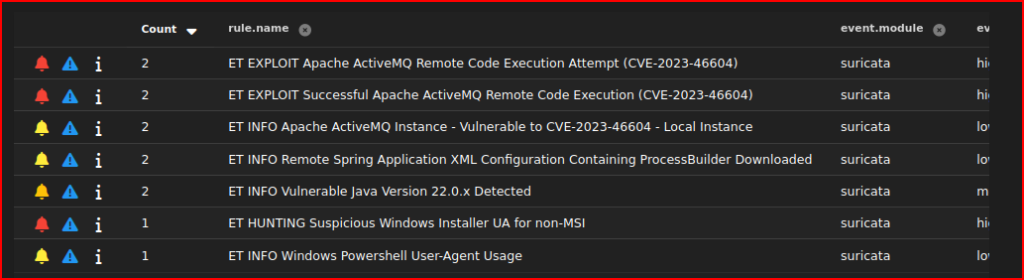
I am first going to drill down on the first one of these alerts and look at some of the details. I already was told that the victim IP’s address is 10.5.11.135 and I see that the associated destination Port (61616) corresponds to the OpenWire service so it matches what I already know about the exploit:

Now, looking at the source IP and Port, I see:

I am then tasked with identifying all the downloaded files:
From the alert I was looking at, I am going to jump directly into the PCAP.
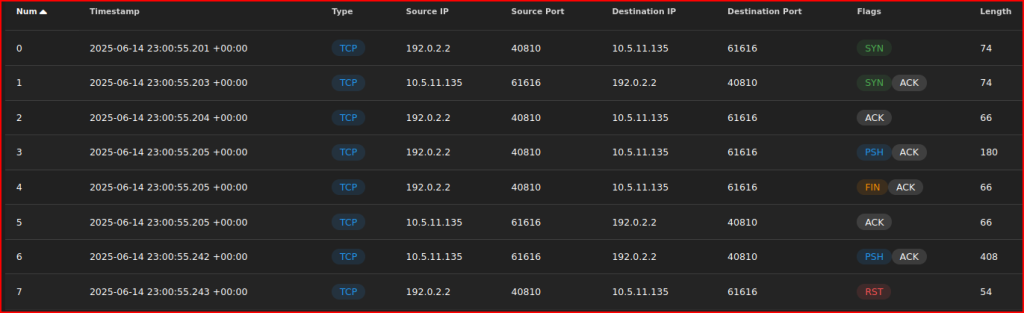
After expanding the payloads’ detail, we can see the first file that was downloaded (the file is called 1.png):

Let’s use the Hunt menu now while looking at the attacker IP address. This should get me to some additional details related to this attack. I can then look at all the zeek Http Requests that are contained in this menu:

I see two more files downloaded that are named 2.png and 4.png.
Leave a Reply